0 ratings




Item #:
1795956
HP USB 3.0 Port Replicator Docking Station (H1L08AA#ABA)
Item #:
1795956
UGX 1009223
Price Details
Excluding Shipping & Custom charges ( Shipping and custom charges will be calculated on checkout )
*All items will import from US
0 ratings
Write a review
In stock
 Imported from USA store
QTY:
Only 2 items left in stock.
Order now and get it around Monday, October 05
Secured transaction
Ubuy works hard to protect your security and privacy. Our advanced payment security system ensures confidentiality by encrypting your information during transmission using AES (Advanced Encryption Standards) and SSL (Secure Socket Layer) protocols. Your payment details are 100% secure as we do not share your payment details with third party sellers.
Our Top Logistics Partners


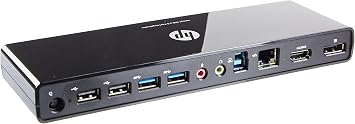
Get online, make up to six of your everyday USB devices immediately available, and expand your productivity with connection to two external displays - all through one USB 3.0 cable.

Fast
Shipping

Free
Return*

Secure Packaging

100% Original Products

PCI DSS Compliance

ISO 27001 Certified



Note: Step Down Voltage Transformer required for using electronics products of US store (110-120). Recommended power converters Buy Now.


What Stands Out
Multiple Ports
Offers a variety of connections including USB, HDMI, and Ethernet to enhance productivity by allowing simultaneous use of multiple devices without the hassle of constant plugging and unplugging.
Fast Data Transfer
Utilizes USB 3.0 technology to deliver high-speed data transfer rates, significantly reducing time spent on file transfers and allowing for efficient multitasking for busy professionals.
Compact Design
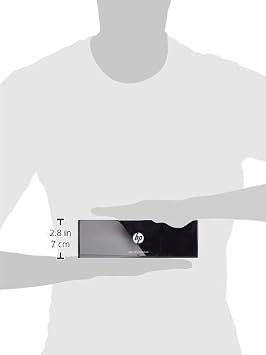
Space-saving design makes it ideal for office environments and portable enough for home use, providing a stylish yet functional solution to expand your workspace without clutter.
Product Details
| Hardware Interface | USB, USB 1.0 |
| Compatible Devices | HP, USB C |
| Total Usb Ports | 6 |
| Number of Ports | 3 |
| Total Number of HDMI Ports | 1 |
| Wattage | 2.5 watts |
| Color | Black |
| Brand | HP |
| Number of Items | 1 |
| Global Trade Identification Number | 00886112582708 |
| UPC | 886112582708 |
| Manufacturer | Hewlett Packard Office |
| Model Number | H1L08AA#ABA |
| Mfr Part Number | H1L08AA#ABA |
| Total USB Ports | 6 |
| Total HDMI Ports | 1 |
| Item Weight | 2.1 lbs (950 grams) |
Who Should Buy?

-
Office Professionals
Ideal for professionals needing multiple displays and device connections for enhanced multitasking efficiency and productivity.
-
Frequent Travelers
Portable design makes it convenient for business travelers who require a quick setup for laptops in various locations.
-
Home Office Users
Perfect for remote workers requiring a reliable docking station to streamline connections for monitors, printers, and peripherals.

-
Casual Users
Not suitable for casual users who may not need multiple connections and can use a standard USB hub instead.
Product Description
Have any Query? Chat with us
Customer Questions & Answers
-
Question:
What devices are compatible with the HP USB 3.0 Port Replicator Docking Station?
Answer: The HP USB 3.0 Port Replicator Docking Station is compatible with a range of HP laptops and tablets that support USB 3.0 or USB-C connections. This includes models from the HP ProBook, EliteBook, and Pavilion series. Utilizing this docking station allows users to connect multiple peripheral devices, enhancing productivity in office or home environments by enabling keyboard, mouse, and additional monitor connections. -
Question:
How does the HP USB 3.0 Port Replicator Docking Station improve productivity?
Answer: This docking station enhances productivity by providing multiple connectivity options, allowing users to easily connect to various peripherals, such as larger screen displays, external hard drives, and network connections. For example, a user can connect a monitor for dual-screen setups, making it perfect for multitasking scenarios or working on detailed projects. With its design, users can manage their workspace more efficiently without constantly plugging and unplugging cables. -
Question:
What are the key features of the HP USB 3.0 Port Replicator Docking Station?
Answer: The key features of the HP USB 3.0 Port Replicator include multiple USB ports (both USB 3.0 and USB 2.0), HDMI and VGA outputs for video connection to monitors, and an Ethernet port for wired internet access. These features make it a versatile solution for users needing to connect various devices quickly. The docking station caters to both home and office environments, enhancing work efficiency and ensuring that all necessary connections are managed from one place. -
Question:
Can I charge my laptop using the HP USB 3.0 Port Replicator Docking Station?
Answer: No, the HP USB 3.0 Port Replicator Docking Station does not provide power to charge laptops. It is primarily designed as a connectivity hub that allows for easier access to peripherals and displays. Users may need a separate power adapter for their laptop, ensuring they maintain adequate power while utilizing the docking station for multiple connections. -
Question:
Is it possible to connect multiple monitors using the HP USB 3.0 Port Replicator Docking Station?
Answer: Yes, you can connect multiple monitors using the HP USB 3.0 Port Replicator Docking Station. It features both HDMI and VGA ports, enabling you to connect two displays simultaneously. This function is particularly useful for users who require expansive desktop space for tasks such as data analysis or graphic design, allowing for a more efficient workflow and better multitasking capabilities. -
Question:
Does the docking station support audio output?
Answer: Yes, the HP USB 3.0 Port Replicator Docking Station supports audio output through HDMI connections. Users can connect their monitors with built-in speakers or use external audio devices via the 3.5mm audio jack for a comprehensive audio experience. This feature allows users to enjoy multimedia presentations or video conferencing with clear sound quality, enhancing communication and entertainment. -
Question:
What is the setup process for the HP USB 3.0 Port Replicator Docking Station?
Answer: Setting up the HP USB 3.0 Port Replicator Docking Station is straightforward. Simply connect the dock to a power source and then use the USB cable to connect it to your laptop. Once connected, your laptop should automatically recognize the dock. You can then plug in your peripherals, such as monitors, keyboard, and mouse. This streamlined process helps users quickly establish a fully-functioning workstation in moments. -
Question:
Can the HP USB 3.0 Port Replicator Docking Station be used with non-HP laptops?
Answer: While primarily designed for HP devices, the HP USB 3.0 Port Replicator Docking Station may also work with other laptops that support USB 3.0 connections. However, functionality may vary depending on the specific laptop brand or model. Users should verify compatibility before using the dock, particularly for optimally integrating connectivity and performance with their device. -
Question:
What type of connectors does the docking station include?
Answer: The HP USB 3.0 Port Replicator Docking Station includes several connectivity options: multiple USB ports (two USB 3.0 and two USB 2.0), one HDMI port, one VGA port, one Ethernet port, and an audio jack. This variety allows users to connect various devices such as printers, external drives, and monitors, making it ideal for both home office and professional environments, where diverse connectivity is essential. -
Question:
Where can I buy the HP USB 3.0 Port Replicator Docking Station (H1L08AA#ABA) in Uganda?
Answer: You can purchase the HP USB 3.0 Port Replicator Docking Station (H1L08AA#ABA) from Ubuy in Uganda. Ubuy offers a wide selection of electronic products, along with detailed product specifications, making it a reliable choice for your shopping needs. Ensure you check the product listing for any additional details that might assist you in your purchase.
HP Docking Stations H1L08AA#ABA Editorial Review
**** The HP USB 3.0 Port Replicator Docking Station (H1L08AA#ABA) presents itself as an appealing solution for users looking to enhance their connectivity options without the hassle of a traditional docking station. Users appreciate the clearly marked USB 3.0 ports, which make them easier to identify compared to those on a laptop. This thoughtful design feature has been a significant positive aspect for many. Functionally, the port replicator has proven to be effective, with users successfully connecting multiple laptops and managing a dual monitor setup. The flexibility to switch between devices and share peripherals such as a keyboard and mouse enhances productivity, making it a valuable asset for both home and office environments. However, the product is not without its challenges. Some users reported difficulties during initial setup, particularly with driver installations, which required a bit of troubleshooting through online forums. Additionally, the longevity of the unit has come into question; while some users enjoyed years of usage, others faced issues like monitor flickering or failure of the power receptacle. Moreover, the after-sales support provided by HP has garnered criticism, particularly when handling warranty claims, leading some customers to express dissatisfaction with their overall experience. Quality control emerged as another concern, with some devices receiving were perceived as used or faulty upon arrival. Given the mixed bag of feedback regarding durability and support, potential buyers might Consider these factors carefully before making their purchase, weighing the convenience it offers against possible future issues. **
Customer Reviews & Ratings
23 customers ratings
-
5 Star
65%
-
4 Star
10%
-
3 Star
10%
-
2 Star
6%
-
1 Star
9%
Review this product
Share your thoughts with other customers
Pros
- Clearly labeled USB 3.0 ports for easy identification.
- Enables connecting multiple laptops and sharing peripherals.
- Functional for dual monitor setups, enhancing productivity.
Cons
- Initial setup may require troubleshooting for drivers.
Platform Trust & Buyer Confidence

JG
Jazz
Verified buyer
“Easy to use and always helpful and sorts any issues I've had past and present”
1 September 2026 · via Trustpilot
EK
Emmanuel
Verified buyer
“I always receive support when I engage customer service. Overall my experience with UBUY has been top notch. Keep up the good work.”
31 August 2026 · via Trustpilot
F
fnd
Verified buyer
“The delivery was fast and the product came undamaged and authentic.”
29 August 2026 · via Trustpilot
LC
Leana
Verified buyer
“Ubuy is extremely efficient and to order online is an easy process. The verity of products to buy is really unlimited! My order was urgent and I got it on time. The products are great! Thank you Ubuy!”
25 August 2026 · via Trustpilot
HL
Hengo
Verified buyer
“Fast, convenient and cheap. Great store!”
27 August 2026 · via Trustpilot
Secure Checkout
Global Delivery
Easy Returns
Genuine Products
Product Price History
Important information
- Limitations : For products shipped internationally, please note that any manufacturer warranty may not be valid; manufacturer service options may not be available; product manuals, instructions, and safety warnings may not be in destination country languages; the products (and accompanying materials) may not be designed in accordance with destination country standards, specifications, and labeling requirements; and the products may not conform to destination country voltage and other electrical standards (requiring use of an adapter or converter if appropriate). The recipient is responsible for assuring that the product can be lawfully imported to the destination country. When ordering from Ubuy or its affiliates, the recipient is the importer of record and must comply with all laws and regulations of the destination country.
- Not all the products listed on Ubuy are for sale, as Ubuy is a global search engine. Products are subject to export/trade regulations.
UGX 1009223
Order now and get it around Monday, October 05
This item is not restrict in my country.(Please click on above link if this item is not restrict in your country, So our team will review and allow.)
QTY:
Only 2 items left in stock.
Secured transaction
PCI DSS compliant and ISO 27001:2022 certified, with encrypted payments and full buyer protection on every order.
Our Top Logistics Partners
Fastest cross-border delivery
Features & Benefits
- Connect up to six USB devices instantly.
- Supports dual external displays.
- One-click connection with USB 3.0 cable.
- Ideal for hot desking environments.
- Enhances productivity effortlessly.
- Compatible with ProBook and Spectre XT Pro series.
Ubuy Assurance
Experience worry-free shopping with 100% original products, PCI DSS-compliant payment security, ISO 27001-certified data protection, the fastest cross-border delivery, free returns *, and secure packaging on every order.