- Home Page /
- Electronics /
- Computer Accessories /
- Computer Accessories & Peripherals /
- Keyboards, Mice & Accessories /
- Computer Keyboards /
- Microsoft Surface Pro Signature Keyboard with...
0 ratings






Item #:
40733657
Microsoft Surface Pro Signature Keyboard with Microsoft Surface Slim Pen 2 - Ice Blue
Item #:
40733657
UGX 1358625
Price Details
Excluding Shipping & Custom charges ( Shipping and custom charges will be calculated on checkout )
*All items will import from US
In stock
 Imported from USA store
QTY:
Only 4 items left in stock.
Order now and get it around Tuesday, August 04
Secured transaction
Ubuy works hard to protect your security and privacy. Our advanced payment security system ensures confidentiality by encrypting your information during transmission using AES (Advanced Encryption Standards) and SSL (Secure Socket Layer) protocols. Your payment details are 100% secure as we do not share your payment details with third party sellers.
Our Top Logistics Partners


Next-level versatility comes in the perfect, premium keyboard, featuring a large glass trackpad and luxurious, Alcantara material covering.

Fast
Shipping

Free
Return*

Secure Packaging

100% Original Products

PCI DSS Compliance

ISO 27001 Certified


Note: Step Down Voltage Transformer required for using electronics products of US store (110-120). Recommended power converters Buy Now.


What Stands Out
Versatile Design
The Microsoft Surface Pro Signature Keyboard offers a sleek, detachable design, allowing users to switch between laptop and tablet mode seamlessly, enhancing productivity and flexibility for on-the-go professionals.
Enhanced Typing Experience
Featuring improved key travel and a spacious layout, the keyboard ensures comfortable and efficient typing, catering to users who require an exceptional writing experience without sacrificing portability.
Integrated Slim Pen 2
The included Slim Pen 2 provides advanced input capabilities with haptic feedback, perfect for note-taking and drawing, making it ideal for creatives and professionals seeking precise control and functionality.
Product Details
- Choose your keyboard color: Red, Ice Blue, Platinum, and Black.(1)
- Always ready at your fingertips. Surface Slim Pen 2 recharges in the built-in storage tray.
- Take notes naturally. The haptic motor in Surface Slim Pen 2 brings the feeling of writing and drawing on paper when used with Surface Pro 8.(2)
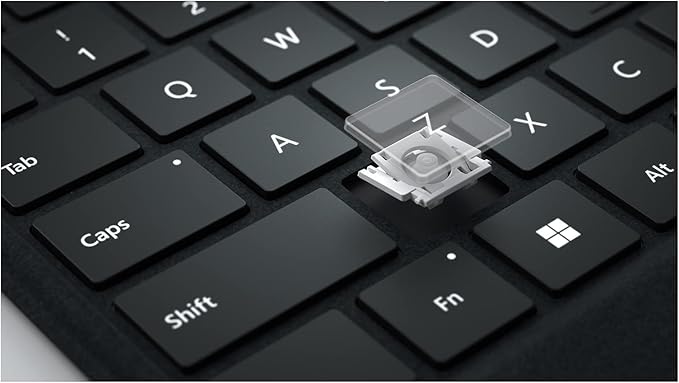
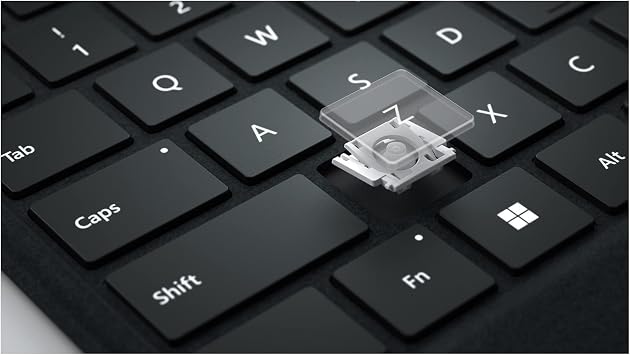
- Features a full mechanical keyset, backlit keys, and large trackpad for precise navigation and control
- Typing and writing in one without the bulk, Surface Pro Signature Keyboard delivers fast and accurate typing like a traditional, full-size keyboard, plus natural on-screen writing
| Compatible Devices | Surface Pro 8, Surface Pro 9, Surface Pro X |
| Connectivity Technology | USB-C |
| Additional Features | Backlit, Trackpad |
| Keyboard Backlighting Color Support | Single Color |
| Language | English |
| Power Source | Battery Powered |
| Switch Type | Mechanical |
| Keyboard Layout | QWERTY |
| Hand Orientation | Ambidextrous |
| Button Quantity | 78 |
| Minimum Required Operating System Version | Windows 10 |
| Compatible Operating System Family | Windows |
| Compatible Tablet Computer Models | Microsoft Surface Pro 8, Microsoft Surface Pro X |
| Number of Keys | 105 |
| Number of Sections | 1 |
| Color | Ice Blue |
| Style Name | Contemporary |
| Item Dimensions L x W x H | 10.01"L x 12.53"W x 0.7"H (25.4 x 31.8 x 1.8 cm) |
| Enclosure Material | Alcantara |
| Brand | Microsoft |
| Keyboard Description | Mechanical |
| Antenna Location | Office |
| Built-In Media | USB Cable |
| Model Number | 8X6-00041 |
| Model Name | Microsoft Surface Pro Signature Mechanical Keyboard - Ice Blue |
| Unit Count | 1.0 Count |
| Manufacturer | Microsoft |
| UPC | 889842772869 |
| External Testing Certification | Não aplicável |
| Generation | 8 |
| Item Weight | 1.4 Pounds (640 grams) |
| Mfr Part Number | 8X6-00041 |
| Recommended Uses For Product | Office |
| Special Feature | Backlit, Trackpad |
| Keyboard backlighting color support | Single Color |
| Style | Contemporary |
| Product Dimensions (L x W x H) | 10.01"L x 12.53"W x 0.7"H (25.4 x 31.8 x 1.8 cm) |
What's in the box
USB Cable
Who Should Buy?

-
Students
Ideal for note-taking, the keyboard and pen enhance productivity in lectures and research tasks with digital flexibility.
-
Creative Professionals
Designed for artists and designers, the Slim Pen 2 allows for precise drawing and editing directly on the Surface Pro.
-
Business Users
Perfect for professionals needing a portable solution for meetings, presentations, and productivity while on the go.

-
Casual Users
Not ideal for casual users who do not require advanced features, as it may offer more than necessary.
Product Description
Have any Query? Chat with us
Customer Questions & Answers
-
Question:
What are the main features of the Microsoft Surface Pro Signature Keyboard with Slim Pen 2?
Answer: The Microsoft Surface Pro Signature Keyboard with Slim Pen 2 offers a premium typing experience with a built-in trackpad, backlit keys, and a comfortable layout. It comes with the Slim Pen 2, which features haptic feedback for enhanced writing precision. This keyboard is designed to be lightweight and portable, making it ideal for both work and creative use on the go. Whether you're drafting emails, taking notes, or sketching designs, the combination of the keyboard and Slim Pen 2 ensures a seamless transition between typing and writing. -
Question:
Is the Slim Pen 2 rechargeable, and how do I charge it?
Answer: Yes, the Slim Pen 2 is rechargeable. It uses a USB-C connection for charging, making it convenient to power up with various devices. The pen provides up to 15 hours of use on a full charge, ensuring you can work or create without interruptions. You can easily recharge it using the included charging cable, or with any compatible charging devices you may already have, making it a user-friendly accessory that minimizes downtime. -
Question:
How does the backlit feature work on the keyboard?
Answer: The backlit feature on the Microsoft Surface Pro Signature Keyboard automatically adjusts based on your environment's lighting conditions. This ensures optimal visibility in any situation, whether you're typing in low-light settings or bright environments. The keyboard lights enable you to continue working or studying without straining your eyes, enhancing both productivity and comfort during extended use. -
Question:
Is the keyboard compatible with all Surface devices?
Answer: The Microsoft Surface Pro Signature Keyboard is specifically designed for use with Surface Pro devices, ensuring a snug fit and seamless performance. While it works best with the Surface Pro 8 and later models, it may also work with previous versions, but with limited features. Always check the compatibility information before purchasing to ensure the best experience and functionality tailored to your specific device. -
Question:
What materials is the keyboard made from?
Answer: The Microsoft Surface Pro Signature Keyboard is crafted from high-quality materials, including a soft-touch fabric covering, which not only provides a premium look and feel but also enhances durability. The keys are made from reinforced materials to ensure longevity, making it a reliable companion for your Surface device. This thoughtful design helps resist wear and tear, ensuring that your keyboard maintains its aesthetic and performance over time. -
Question:
Can I use the Slim Pen 2 on other devices or apps?
Answer: The Slim Pen 2 is primarily optimized for use with Microsoft Surface devices, especially in apps that support Windows Ink technology. However, you can also use it on other touchscreen devices that support stylus input, although the full range of features may not be accessible. For creative applications like drawing or note-taking, it performs exceptionally well on compatible platforms, making it a versatile tool for artists and professionals alike. -
Question:
What makes the haptic feedback feature of the Slim Pen 2 beneficial?
Answer: The haptic feedback feature of the Slim Pen 2 provides tactile responses that mimic the sensation of writing on paper. This adds a layer of realism and enhances the overall writing experience, allowing you to feel more connected to your work. Whether you're sketching or jotting down notes, the feedback helps improve precision and reduces the disconnect often experienced when using a stylus on a digital surface. -
Question:
Is the keyboard water-resistant or spill-proof?
Answer: While the Microsoft Surface Pro Signature Keyboard is not marketed as water-resistant or spill-proof, it is designed to withstand everyday spills and accidents. Quick wipeable fabric materials help clean off any spills easily, although it is advisable to avoid exposing the keyboard to excessive moisture. This feature is particularly useful for those who often work in dynamic environments, combining functionality with practicality for everyday situations. -
Question:
How do I connect the keyboard and Slim Pen 2 with my Surface device?
Answer: Connecting the Microsoft Surface Pro Signature Keyboard and Slim Pen 2 to your Surface device is straightforward. Simply attach the keyboard to your Surface device's magnetic slot, which ensures a solid connection. For the Slim Pen 2, it pairs automatically via Bluetooth when in proximity. Once connected, you can instantly start typing or writing without any complicated setup, streamlining your workflow right from the start. -
Question:
Where can I buy the Microsoft Surface Pro Signature Keyboard with Slim Pen 2 - Black?
Answer: You can purchase the Microsoft Surface Pro Signature Keyboard with Slim Pen 2 - Black from Ubuy in Uganda. Ubuy offers a variety of electronic products, ensuring you find the right model for your needs along with detailed descriptions and specifications to aid in your decision. Enjoy a smooth shopping experience with reliable shipping and customer service from Ubuy.
Microsoft Keyboards 8X6-00041 Editorial Review


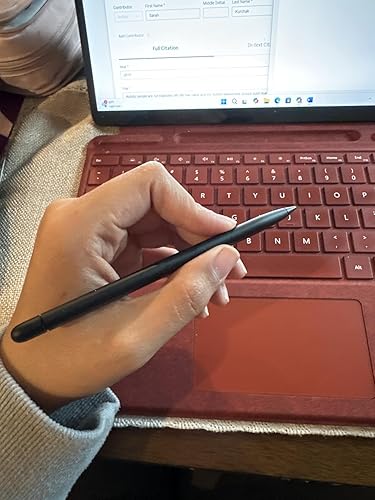


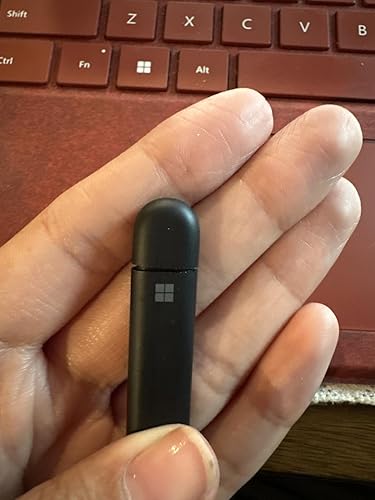


The Microsoft Surface Pro Signature Keyboard with Slim Pen 2 in black is a convenient and functional tool for those who want to add a keyboard and stylus to their Surface Pro X or Surface Pro 8. The slim pen 2 is a Bluetooth device that works well for writing and drawing, while the keyboard is attached magnetically. The keyboard is easy to attach and detach and has large keys with a standard layout making it easy to use. There is a spot to the left of the touchpad where the pen can attach via magnet which is neat. However, some customers have reported issues with the product, such as the pen not working after a few days, sore wrists after extended use and fumes emanating from the device. Additionally, the keyboard is not compatible with Surface Pro 6 and some customers were given incorrect information from Microsoft sales agents on compatibility, leading to frustration. Overall, the Microsoft Surface Pro Signature Keyboard with Slim Pen 2 is a good product, but customers should be cautious of potential issues.
Customer Reviews & Ratings
1362 customers ratings
-
5 Star
80%
-
4 Star
9%
-
3 Star
3%
-
2 Star
3%
-
1 Star
5%
Review this product
Share your thoughts with other customers
Pros
- Slim pen 2 works well for writing and drawing
- Keyboard is easy to attach and detach
- Large keys with a standard layout make it easy to use
- Neat spot to attach pen via magnet on the left of the touchpad
Cons
- Pen may stop working after a few days
Platform Trust & Buyer Confidence

MT
Mohd
Verified buyer
“The product received very good packaging & safe…Thank You”
16 June 2026 · via Trustpilot
SJ
Shawati
Verified buyer
“Accurate delivery timing given”
16 June 2026 · via Trustpilot
YB
Youcef
Verified buyer
“Not madly expensive like I thought, and much quicker than promised.”
15 June 2026 · via Trustpilot
LM
Leila
Verified buyer
“Never dealt with Ubuy before, but everything worked out great. Seamless cross border purchasing and shipping. Thanks!”
6/7/2026 · via Trustpilot
KA
Kwame
Verified buyer
“The process was smooth, with clear communication and timelines. This was my 1st purchase and I am really impressed. I will definitely be coming back.”
12 June 2026 · via Trustpilot
Secure Checkout
Global Delivery
Easy Returns
Genuine Products
Product Price History
Important information
- Limitations : For products shipped internationally, please note that any manufacturer warranty may not be valid; manufacturer service options may not be available; product manuals, instructions, and safety warnings may not be in destination country languages; the products (and accompanying materials) may not be designed in accordance with destination country standards, specifications, and labeling requirements; and the products may not conform to destination country voltage and other electrical standards (requiring use of an adapter or converter if appropriate). The recipient is responsible for assuring that the product can be lawfully imported to the destination country. When ordering from Ubuy or its affiliates, the recipient is the importer of record and must comply with all laws and regulations of the destination country.
- Not all the products listed on Ubuy are for sale, as Ubuy is a global search engine. Products are subject to export/trade regulations.
UGX 1358625
Order now and get it around Tuesday, August 04
This item is not restrict in my country.(Please click on above link if this item is not restrict in your country, So our team will review and allow.)
QTY:
Only 4 items left in stock.
Secured transaction
PCI DSS compliant and ISO 27001:2022 certified, with encrypted payments and full buyer protection on every order.
Our Top Logistics Partners
Fastest cross-border delivery
Features & Benefits
- Premium keyboard with next-level versatility
- Large glass trackpad for precise navigation
- Luxurious Alcantara material covering
- Choose from multiple color options
- Fast and accurate typing
- Natural on-screen writing
Ubuy Assurance
Experience worry-free shopping with 100% original products, PCI DSS-compliant payment security, ISO 27001-certified data protection, the fastest cross-border delivery, free returns *, and secure packaging on every order.